Yep, we may get a tiny thank-you (read: commission) when you buy through links on Gadgetspotr — not enough for a yacht, but enough to keep the lights (and servers) on. Learn more
What makes the MakerGear M3-ID special? We looked at 159 specs & features in this 3d printer — including community-favorites like general information, dimensions & weight, environmental & power & build specifications.
A fast snapshot of the MakerGear M3-ID, covering its standout specification and what you can expect right out of the box.
MakerGear M3-ID
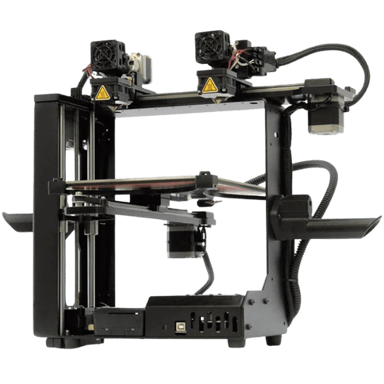
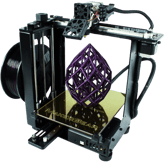
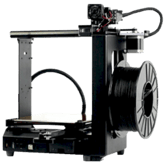
The MakerGear M3-ID is a professional-grade desktop 3D printer known for its rugged steel frame and innovative Independent Dual Extrusion (IDEX) system. This unique setup allows users to print two identical parts at the same time or use soluble support materials to create incredibly complex geometries with ease. Equipped with "True-Leveling" technology and high-temperature hotends, it offers a reliable, low-maintenance experience for engineers and educators alike.
Specifications & Facts 159
Specs measured. Drama avoided.
Digging deep into the MakerGear M3-ID 3d printer — we cover price, full specs, pros, cons, and compare it with top-rated 3d printers.
General Information 12
MakerGear M3-ID Product Name
What is the product name?
0 MakerGear M3-ID 0 Votes MakerGear M3-ID
3D Printer in this range Who knows? (Help us out by suggesting one!)
The commercial name of the 3D printer.
Don’t keep it to yourself — be the first to react and review the Product Name on MakerGear M3-ID ◉ and help others decide!
MakerGear M3-ID Model Number
What is the model number?
0 MakerGear M3-ID 0 Votes M-MUV-6AJD
3D Printer in this range Who knows? (Help us out by suggesting one!)
Manufacturer’s reference code for precise identification.
Don’t keep it to yourself — be the first to react and review the Model Number on MakerGear M3-ID ◉ and help others decide!
MakerGear M3-ID Release Year
What is the release year?
0 MakerGear M3-ID 0 Votes 2017
3D Printer in this range Who knows? (Help us out by suggesting one!)
The year the 3D printer was first released.
Don’t keep it to yourself — be the first to react and review the Release Year on MakerGear M3-ID ◉ and help others decide!
MakerGear M3-ID Printer Type
What type of printer is it?
0 MakerGear M3-ID 0 Votes FDM/FFF
3D Printer in this range Who knows? (Help us out by suggesting one!)
Defines the printing technology used by the machine.
Don’t keep it to yourself — be the first to react and review the Printer Type on MakerGear M3-ID ◉ and help others decide!
MakerGear M3-ID Target User Level
What is the target user level?
0 MakerGear M3-ID 0 Votes Professional
3D Printer in this range Who knows? (Help us out by suggesting one!)
Indicates the recommended skill level.
Don’t keep it to yourself — be the first to react and review the Target User Level on MakerGear M3-ID ◉ and help others decide!
MakerGear M3-ID Assembly Type
What is the assembly type?
0 MakerGear M3-ID 0 Votes Prebuilt
3D Printer in this range Who knows? (Help us out by suggesting one!)
Shows whether the printer is sold as a kit requiring assembly or fully prebuilt.
Don’t keep it to yourself — be the first to react and review the Assembly Type on MakerGear M3-ID ◉ and help others decide!
MakerGear M3-ID Country of Origin
What is the country of origin?
0 MakerGear M3-ID 0 Votes USA
3D Printer in this range Who knows? (Help us out by suggesting one!)
The country where the product is designed or manufactured.
Don’t keep it to yourself — be the first to react and review the Country of Origin on MakerGear M3-ID ◉ and help others decide!
3D Printer in this range Who knows? (Help us out by suggesting one!)
Lists the most common applications supported.
Don’t keep it to yourself — be the first to react and review the Supported Applications on MakerGear M3-ID ◉ and help others decide!
MakerGear M3-ID Assembly Required
Is assembly required?
No 0Votes MakerGear M3-ID
3D Printer in this range Who knows? (Help us out by suggesting one!)
States if the printer requires assembly.
Don’t keep it to yourself — be the first to react and review the Assembly Required on MakerGear M3-ID ◉ and help others decide!
MakerGear M3-ID Upgrade Path
Does it support an upgrade path?
Yes 0Votes MakerGear M3-ID
3D Printer in this range Who knows? (Help us out by suggesting one!)
Whether the printer can be expanded with official or third-party upgrades.
Don’t keep it to yourself — be the first to react and review the Upgrade Path on MakerGear M3-ID ◉ and help others decide!
MakerGear M3-ID Warranty Period
What is the warranty period?
0 MakerGear M3-ID 0 Votes 1 Year
3D Printer in this range Who knows? (Help us out by suggesting one!)
Coverage period offered by the manufacturer.
Don’t keep it to yourself — be the first to react and review the Warranty Period on MakerGear M3-ID ◉ and help others decide!
Dimensions & Weight 13
MakerGear M3-ID Weight
What is the printer’s weight?
29.5 lbs 0Votes
3D Printer in this range Who knows? (Help us out by suggesting one!)
MakerGear M3-ID
The printer weighs 29.5 lbs (13.38 kg), which reflects its build and portability characteristics.
Net weight of the printer.
Don’t keep it to yourself — be the first to react and review the Weight on MakerGear M3-ID ◉ and help others decide!
MakerGear M3-ID Package Weight
What is the package weight?
42 lbs 0Votes
3D Printer in this range Who knows? (Help us out by suggesting one!)
MakerGear M3-ID
The package weight is 42 lbs (19.05 kg), including all components and packaging materials.
total shipping weight including packaging.
Don’t keep it to yourself — be the first to react and review the Package Weight on MakerGear M3-ID ◉ and help others decide!
MakerGear M3-ID Folded Height
What is the folded height?
18 inch 0Votes
3D Printer in this range Who knows? (Help us out by suggesting one!)
MakerGear M3-ID
The folded height is 18 inch (45.72 cm). This dimension indicates the vertical space needed to store or transport the 3D printer when folded.
Height of the printer when folded.
Don’t keep it to yourself — be the first to react and review the Folded Height on MakerGear M3-ID ◉ and help others decide!
MakerGear M3-ID Build-to-Printer Size Ratio
What is the build-to-printer size ratio?
26.7 % 0Votes
3D Printer in this range Who knows? (Help us out by suggesting one!)
MakerGear M3-ID
The build-to-printer size ratio is 26.7%, showing the portion of printer volume dedicated to the build area.
The efficiency ratio of build volume relative to the overall printer size.
Don’t keep it to yourself — be the first to react and review the Build-to-Printer Size Ratio on MakerGear M3-ID ◉ and help others decide!
MakerGear M3-ID Width
What is the printer’s width?
21 inch 0Votes
3D Printer in this range Who knows? (Help us out by suggesting one!)
The total external width of the printer.
Don’t keep it to yourself — be the first to react and review the Width on MakerGear M3-ID ◉ and help others decide!
MakerGear M3-ID Depth
What is the printer’s depth?
24 inch 0Votes
3D Printer in this range Who knows? (Help us out by suggesting one!)
The total external depth of the printer.
Don’t keep it to yourself — be the first to react and review the Depth on MakerGear M3-ID ◉ and help others decide!
MakerGear M3-ID Height
What is the printer’s height?
21 inch 0Votes
3D Printer in this range Who knows? (Help us out by suggesting one!)
The total external height of the printer.
Don’t keep it to yourself — be the first to react and review the Height on MakerGear M3-ID ◉ and help others decide!
MakerGear M3-ID Package Width
What is the package width?
21 inch 0Votes
3D Printer in this range Who knows? (Help us out by suggesting one!)
Width of the printer’s packaging.
Don’t keep it to yourself — be the first to react and review the Package Width on MakerGear M3-ID ◉ and help others decide!
MakerGear M3-ID Package Depth
What is the package depth?
21 inch 0Votes
3D Printer in this range Who knows? (Help us out by suggesting one!)
Depth of the printer’s packaging.
Don’t keep it to yourself — be the first to react and review the Package Depth on MakerGear M3-ID ◉ and help others decide!
MakerGear M3-ID Package Height
What is the package height?
25 inch 0Votes
3D Printer in this range Who knows? (Help us out by suggesting one!)
Height of the printer’s packaging.
Don’t keep it to yourself — be the first to react and review the Package Height on MakerGear M3-ID ◉ and help others decide!
MakerGear M3-ID Folded Width
What is the folded width?
18 inch 0Votes
3D Printer in this range Who knows? (Help us out by suggesting one!)
Width of the printer when folded (if applicable).
Don’t keep it to yourself — be the first to react and review the Folded Width on MakerGear M3-ID ◉ and help others decide!
MakerGear M3-ID Folded Depth
What is the folded depth?
16 inch 0Votes
3D Printer in this range Who knows? (Help us out by suggesting one!)
Depth of the printer when folded.
Don’t keep it to yourself — be the first to react and review the Folded Depth on MakerGear M3-ID ◉ and help others decide!
MakerGear M3-ID Space Requirement
What is the space requirement?
2 sq ft 0Votes
3D Printer in this range Who knows? (Help us out by suggesting one!)
The minimum flat surface area needed to safely place the printer.
Don’t keep it to yourself — be the first to react and review the Space Requirement on MakerGear M3-ID ◉ and help others decide!
Environmental & Power 9
MakerGear M3-ID Power Supply Type
What type of power supply does it use?
0 MakerGear M3-ID 0 Votes Internal
3D Printer in this range Who knows? (Help us out by suggesting one!)
MakerGear M3-ID
The power supply type is internal, which simplifies setup and reduces external equipment.
Indicates whether the printer uses an internal or external power supply.
Don’t keep it to yourself — be the first to react and review the Power Supply Type on MakerGear M3-ID ◉ and help others decide!
MakerGear M3-ID Power Supply Voltage
What is the required power supply voltage?
0 MakerGear M3-ID 0 Votes 100-240 Volt
3D Printer in this range Who knows? (Help us out by suggesting one!)
MakerGear M3-ID
The power supply supports an input voltage range of 100-240 Volt, making it compatible with most global power standards.
Voltage input supported by the printer’s power supply.
Don’t keep it to yourself — be the first to react and review the Power Supply Voltage on MakerGear M3-ID ◉ and help others decide!
MakerGear M3-ID Idle Power Consumption
What is the idle power consumption?
60 Watt 0Votes
3D Printer in this range Who knows? (Help us out by suggesting one!)
MakerGear M3-ID
Idle power consumption is 60 Watt, indicating the energy used when the printer is on but not actively printing.
Power drawn while the printer is on but not printing.
Don’t keep it to yourself — be the first to react and review the Idle Power Consumption on MakerGear M3-ID ◉ and help others decide!
MakerGear M3-ID Operating Temperature Range
What is the operating temperature range?
0 MakerGear M3-ID 0 Votes 59-90 °F
3D Printer in this range Who knows? (Help us out by suggesting one!)
Recommended ambient temperature range for safe operation.
Don’t keep it to yourself — be the first to react and review the Operating Temperature Range on MakerGear M3-ID ◉ and help others decide!
MakerGear M3-ID Storage Temperature Range
What is the storage temperature range?
0 MakerGear M3-ID 0 Votes 32-90 °F
3D Printer in this range Who knows? (Help us out by suggesting one!)
Safe temperature range for storing the printer when not in use.
Don’t keep it to yourself — be the first to react and review the Storage Temperature Range on MakerGear M3-ID ◉ and help others decide!
MakerGear M3-ID Power Consumption
What is the power consumption?
360 Watt 0Votes
3D Printer in this range Who knows? (Help us out by suggesting one!)
Average power usage during active printing.
Don’t keep it to yourself — be the first to react and review the Power Consumption on MakerGear M3-ID ◉ and help others decide!
MakerGear M3-ID Operating Humidity Range
What is the operating humidity range?
0 MakerGear M3-ID 0 Votes 20-80%
3D Printer in this range Who knows? (Help us out by suggesting one!)
Acceptable humidity range during printer operation.
Don’t keep it to yourself — be the first to react and review the Operating Humidity Range on MakerGear M3-ID ◉ and help others decide!
MakerGear M3-ID Storage Humidity Range
What is the storage humidity range?
0 MakerGear M3-ID 0 Votes 10-90%
3D Printer in this range Who knows? (Help us out by suggesting one!)
Safe humidity range for storing the printer.
Don’t keep it to yourself — be the first to react and review the Storage Humidity Range on MakerGear M3-ID ◉ and help others decide!
MakerGear M3-ID Energy Saving Mode
Does it have energy saving mode?
No 0Votes MakerGear M3-ID
3D Printer in this range Who knows? (Help us out by suggesting one!)
Whether the printer includes an energy-saving or eco mode.
Don’t keep it to yourself — be the first to react and review the Energy Saving Mode on MakerGear M3-ID ◉ and help others decide!
Build Specifications 20
MakerGear M3-ID Build Depth
What is the build depth?
9.13 inch 0Votes
3D Printer in this range Who knows? (Help us out by suggesting one!)
MakerGear M3-ID
The build depth is 9.13 inch (23.19 cm), determining the front-to-back printable area.
Maximum printable depth of the build area.
Don’t keep it to yourself — be the first to react and review the Build Depth on MakerGear M3-ID ◉ and help others decide!
MakerGear M3-ID Filament Diameter Supported
What filament diameter is supported?
1.75 mm 0Votes
3D Printer in this range Who knows? (Help us out by suggesting one!)
MakerGear M3-ID
Supported filament diameter is 1.75 mm, a common size compatible with most filaments.
The filament size compatible with printer.
Don’t keep it to yourself — be the first to react and review the Filament Diameter Supported on MakerGear M3-ID ◉ and help others decide!
MakerGear M3-ID Max Extruder Temperature
What is the max extruder temperature?
572 °F 0Votes
3D Printer in this range Who knows? (Help us out by suggesting one!)
MakerGear M3-ID
The maximum extruder temperature is 572 °F (300 °C), allowing for printing with a broad range of thermoplastics including high-temperature materials.
Maximum heating capability of extruder.
Don’t keep it to yourself — be the first to react and review the Max Extruder Temperature on MakerGear M3-ID ◉ and help others decide!
MakerGear M3-ID Number of Extruders
How many extruders does the printer have?
0 MakerGear M3-ID 0 Votes 2
3D Printer in this range Who knows? (Help us out by suggesting one!)
MakerGear M3-ID
The printer includes two extruders, enabling multi-material or multi-color printing.
total extruders installed.
Don’t keep it to yourself — be the first to react and review the Number of Extruders on MakerGear M3-ID ◉ and help others decide!
MakerGear M3-ID Build Volume
What is the build volume?
335 cubic in 0Votes
3D Printer in this range Who knows? (Help us out by suggesting one!)
MakerGear M3-ID
The printer's build volume at 335 cubic inches (5,489.68 cubic cm) supports reasonable object sizes for diverse applications.
total printable volume capacity.
Don’t keep it to yourself — be the first to react and review the Build Volume on MakerGear M3-ID ◉ and help others decide!
MakerGear M3-ID Bed Temperature Gradient
What is the bed temperature gradient?
5 °F 0Votes
3D Printer in this range Who knows? (Help us out by suggesting one!)
MakerGear M3-ID
Bed temperature gradient is 5 °F (approximately 2.78 °C), representing the temperature difference across the build plate that could affect print adhesion and quality.
Variance in heat across the bed surface.
Don’t keep it to yourself — be the first to react and review the Bed Temperature Gradient on MakerGear M3-ID ◉ and help others decide!
MakerGear M3-ID Hotend Replaceable
Is the hotend replaceable?
Yes 0Votes MakerGear M3-ID
3D Printer in this range Who knows? (Help us out by suggesting one!)
MakerGear M3-ID
The hotend is replaceable, permitting maintenance and upgrades for different printing needs.
Whether the hotend can be replaced.
Don’t keep it to yourself — be the first to react and review the Hotend Replaceable on MakerGear M3-ID ◉ and help others decide!
MakerGear M3-ID Build Width
What is the build width?
7.99 inch 0Votes
3D Printer in this range Who knows? (Help us out by suggesting one!)
Maximum printable width of the build area.
Don’t keep it to yourself — be the first to react and review the Build Width on MakerGear M3-ID ◉ and help others decide!
MakerGear M3-ID Build Height
What is the build height?
7.99 inch 0Votes
3D Printer in this range Who knows? (Help us out by suggesting one!)
Maximum printable height of the build area.
Don’t keep it to yourself — be the first to react and review the Build Height on MakerGear M3-ID ◉ and help others decide!
MakerGear M3-ID Layer Resolution Minimum
What is the minimum layer resolution?
20 microns 0Votes
3D Printer in this range Who knows? (Help us out by suggesting one!)
Finest layer height achievable.
Don’t keep it to yourself — be the first to react and review the Layer Resolution Minimum on MakerGear M3-ID ◉ and help others decide!
MakerGear M3-ID Layer Resolution Maximum
What is the maximum layer resolution?
350 microns 0Votes
3D Printer in this range Who knows? (Help us out by suggesting one!)
Thickest layer height achievable.
Don’t keep it to yourself — be the first to react and review the Layer Resolution Maximum on MakerGear M3-ID ◉ and help others decide!
MakerGear M3-ID Standard Nozzle Diameter
What is the standard nozzle diameter?
0.35 mm 0Votes
3D Printer in this range Who knows? (Help us out by suggesting one!)
Default nozzle diameter provided.
Don’t keep it to yourself — be the first to react and review the Standard Nozzle Diameter on MakerGear M3-ID ◉ and help others decide!
MakerGear M3-ID Independent Dual Extruder
Does it have IDEX support?
Yes 0Votes MakerGear M3-ID
3D Printer in this range Who knows? (Help us out by suggesting one!)
Whether the printer supports independent extruder heads.
Don’t keep it to yourself — be the first to react and review the Independent Dual Extruder on MakerGear M3-ID ◉ and help others decide!
MakerGear M3-ID Extruder Drive Type
What type of extruder drive does it use?
0 MakerGear M3-ID 0 Votes Direct Drive
3D Printer in this range Who knows? (Help us out by suggesting one!)
The type of filament feeding system.
Don’t keep it to yourself — be the first to react and review the Extruder Drive Type on MakerGear M3-ID ◉ and help others decide!
3D Printer in this range Who knows? (Help us out by suggesting one!)
MakerGear M3-ID
The printer supports popular slicing software including Cura, Simplify3D, Slic3r, and Repetier-host, providing flexibility in preparing 3D models for printing.
Slicer programs that are compatible with the printer.
Don’t keep it to yourself — be the first to react and review the Supported Slicers on MakerGear M3-ID ◉ and help others decide!
MakerGear M3-ID Supported File Formats
What file formats are supported?
0 MakerGear M3-ID 0 Votes STL, OBJ, G-code
3D Printer in this range Who knows? (Help us out by suggesting one!)
MakerGear M3-ID
The printer supports file formats STL, OBJ, and G-code, which are standard for 3D printing workflows.
File types accepted for printing.
Don’t keep it to yourself — be the first to react and review the Supported File Formats on MakerGear M3-ID ◉ and help others decide!
MakerGear M3-ID Connectivity Options
What connectivity options are available?
0 MakerGear M3-ID 0 Votes Wi-Fi, LAN, USB
3D Printer in this range Who knows? (Help us out by suggesting one!)
Available connection types for file transfer and control.
Don’t keep it to yourself — be the first to react and review the Connectivity Options on MakerGear M3-ID ◉ and help others decide!
MakerGear M3-ID Remote Monitoring
Does it support remote monitoring?
No 0Votes MakerGear M3-ID
3D Printer in this range Who knows? (Help us out by suggesting one!)
Ability to monitor prints remotely via app or web.
Don’t keep it to yourself — be the first to react and review the Remote Monitoring on MakerGear M3-ID ◉ and help others decide!
MakerGear M3-ID Cloud-Based Software
Does it support cloud-based software?
No 0Votes MakerGear M3-ID
3D Printer in this range Who knows? (Help us out by suggesting one!)
Indicates whether the printer uses or supports cloud software.
Don’t keep it to yourself — be the first to react and review the Cloud-Based Software on MakerGear M3-ID ◉ and help others decide!
MakerGear M3-ID Proprietary Software Required
Is proprietary software required?
No 0Votes MakerGear M3-ID
3D Printer in this range Who knows? (Help us out by suggesting one!)
Whether use of manufacturer’s software is mandatory.
Don’t keep it to yourself — be the first to react and review the Proprietary Software Required on MakerGear M3-ID ◉ and help others decide!
MakerGear M3-ID File Transfer Method
What file transfer methods are supported?
0 MakerGear M3-ID 0 Votes SD Card, USB
3D Printer in this range Who knows? (Help us out by suggesting one!)
Methods available to transfer files to the printer.
Don’t keep it to yourself — be the first to react and review the File Transfer Method on MakerGear M3-ID ◉ and help others decide!
MakerGear M3-ID Mobile App
Does it support a mobile app?
No 0Votes MakerGear M3-ID
3D Printer in this range Who knows? (Help us out by suggesting one!)
Ability to use a mobile app for control/monitoring.
Don’t keep it to yourself — be the first to react and review the Mobile App on MakerGear M3-ID ◉ and help others decide!
MakerGear M3-ID API/SDK Integration
Does it support API/SDK integration?
No 0Votes MakerGear M3-ID
3D Printer in this range Who knows? (Help us out by suggesting one!)
Allows developers to integrate with APIs or SDKs.
Don’t keep it to yourself — be the first to react and review the API/SDK Integration on MakerGear M3-ID ◉ and help others decide!
MakerGear M3-ID Multi-Printer Fleet Control
Does it support multi-printer fleet control?
No 0Votes MakerGear M3-ID
3D Printer in this range Who knows? (Help us out by suggesting one!)
 Supermod
  Moderator